





Google Analytics and Search Console Reporting Made Easier with TimeWhip
Your client wants to know how their website is performing. Your team needs to understand which channels bring visitors and which pages deserve attention.
The data is available. Getting it into a clear, shareable report is where the extra work begins.
You open Google Analytics, check Search Console, choose a date range, collect the numbers and prepare an email. Next week or next month, you repeat the process.
TimeWhip brings Google Analytics 4 and Google Search Console reporting into your project workflow. Connect your accounts, choose what to include, and generate reports when you need them—or schedule recurring email delivery.
Give Every Project Its Own Reporting Setup
When you manage several websites, keeping reports connected to the right project matters.
TimeWhip lets you connect a Google account with access to your website data, select the project’s GA4 property and choose a Google Search Console site.
This gives your team a dedicated place to manage that project’s reporting, recipients and report history. It also works alongside TimeWhip’s project and task management features, helping teams keep performance reporting connected to the relevant client and project.
For an agency, it means a more organised way to handle updates across client accounts. For an internal marketing team, it creates a consistent reporting routine around the website you manage.
Show What Is Happening on Your Website
A useful report should help readers understand performance without making them search through every available metric.
TimeWhip lets you choose the Analytics sections relevant to your audience:
- Overview: Sessions, users, pageviews and bounce rate.
- Traffic sources: The channels and referrals bringing visitors.
- Top pages: The pages attracting the most visits.
- Devices: How visitors are split across desktop, mobile and tablet.
- Countries: Where your website audience comes from.
Browser information is also included in Analytics reports.
These details give your next conversation a practical starting point. Which channels deserve closer attention? Which content attracts visitors? How much of your audience uses mobile?
Choose the sections your readers need and keep the report focused.
Bring Search Visibility Into the Conversation
Website traffic tells part of the story. Google Search Console adds context about how people discover your website through Google Search.
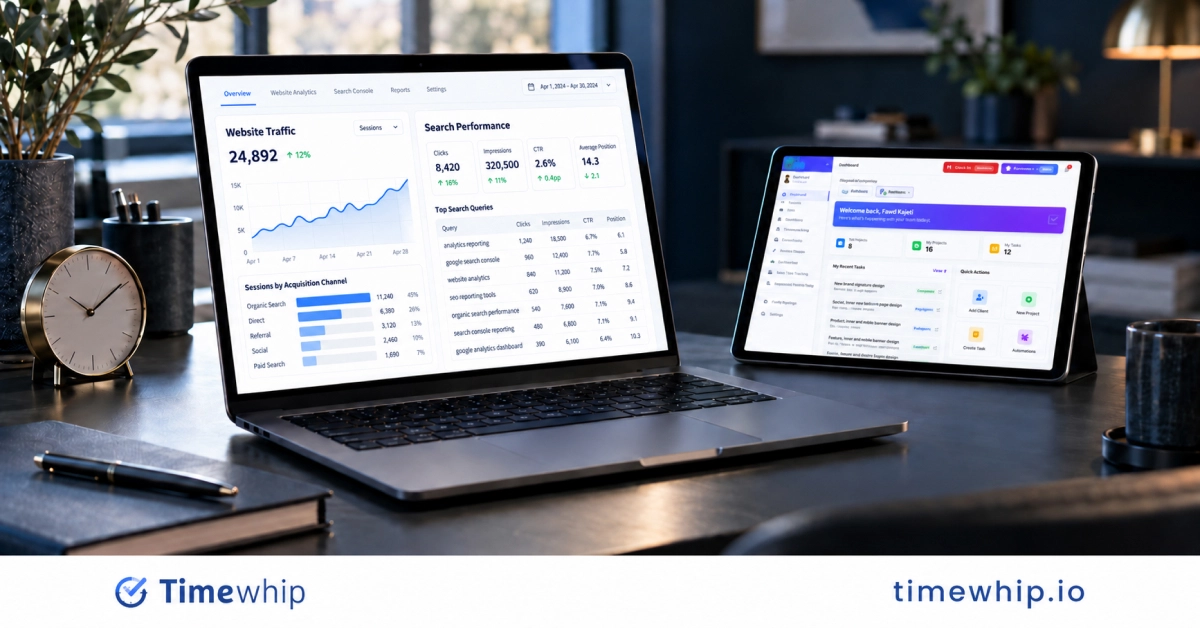
TimeWhip’s Search Console reporting includes clicks, impressions and query information such as click-through rate and average position.
 This helps you explore questions such as:
- Which search terms are bringing people to the website?
- Which queries are gaining clicks?
- Where is the site appearing in search results without attracting many visits?
- Which keywords have high impressions but a low click-through rate?
- Which pages may benefit from further SEO optimisation?
For SEO teams and agencies, this makes it easier to discuss organic search performance alongside website activity.
You can choose to send Analytics reports, Search Console reports or both.
Schedule Reports Around Your Reporting Routine
Regular updates are easier to maintain when delivery is already scheduled.
TimeWhip supports daily, weekly and monthly report emails. You can choose the delivery time and timezone, add recipients and select the reporting period.
Available scheduled reporting periods include:
- Last seven days
- Last week
- Last 30 days
- Last month
- Last 90 days
For example, an agency could schedule a monthly update covering the previous calendar month. A marketing manager could choose a weekly report to prepare for a recurring team meeting.
Once the connection and schedule are configured, TimeWhip fetches the data and emails recipients on that recurring schedule.
If your team regularly spends hours assembling client updates, see how Inleads IT saved 15 hours a week on client reporting using a more consistent TimeWhip reporting workflow.
Generate a Report Whenever You Need One
Scheduled updates handle the routine. On-demand reports help with everything in between.
Before a client call, campaign review or planning session, you can generate a report using a preset or custom date range. Choose the Analytics sections to include and, when needed, email the report to selected recipients.
You can also revisit generated reports in the project’s report history.
For another way to reduce repetitive reporting work, learn how AI can write your weekly status reports.
Make Reports Easy to Open
Sharing a report should be straightforward for the person receiving it.
TimeWhip provides public report links that recipients can open without logging in. Anyone with the link can view the report, making it convenient to share with intended clients and stakeholders.
Your client can follow the link from an email and review the results without navigating your internal workspace.
Because these links may contain business performance data, share them only with the relevant clients and stakeholders.
Build a More Consistent Client Reporting Experience
Clear, regular reports give clients a better basis for understanding progress and asking useful questions.
With a repeatable reporting workflow, your team can spend less effort assembling updates and more time explaining what the numbers mean.
That is the practical value of TimeWhip’s Analytics and Search Console reporting: project-specific setup, customisable reports, recurring delivery and accessible sharing in one workflow.
Teams can combine these website performance updates with TimeWhip’s wider time tracking and reporting tools to create a clearer view of both project activity and marketing outcomes.
Get Started With TimeWhip
Create your account, open your project’s Google Analytics Reports page, connect your Google account and select the relevant GA4 property and Search Console site.
Then add your recipients and generate your first report—or configure a recurring schedule.
Create your free TimeWhip account and make your next website performance update easier to deliver.